Discord、ゲーム、会議、配信、聴覚サポート
AuroraはDiscord、ゲーム、会議、配信、動画の上にライブ字幕とリアルタイム翻訳を表示します。一回払い。月額なし。

Aurora Subtitles
AuroraはDiscord、ゲーム、会議、配信、動画の上にライブ字幕とリアルタイム翻訳を表示します。一回払い。月額なし。
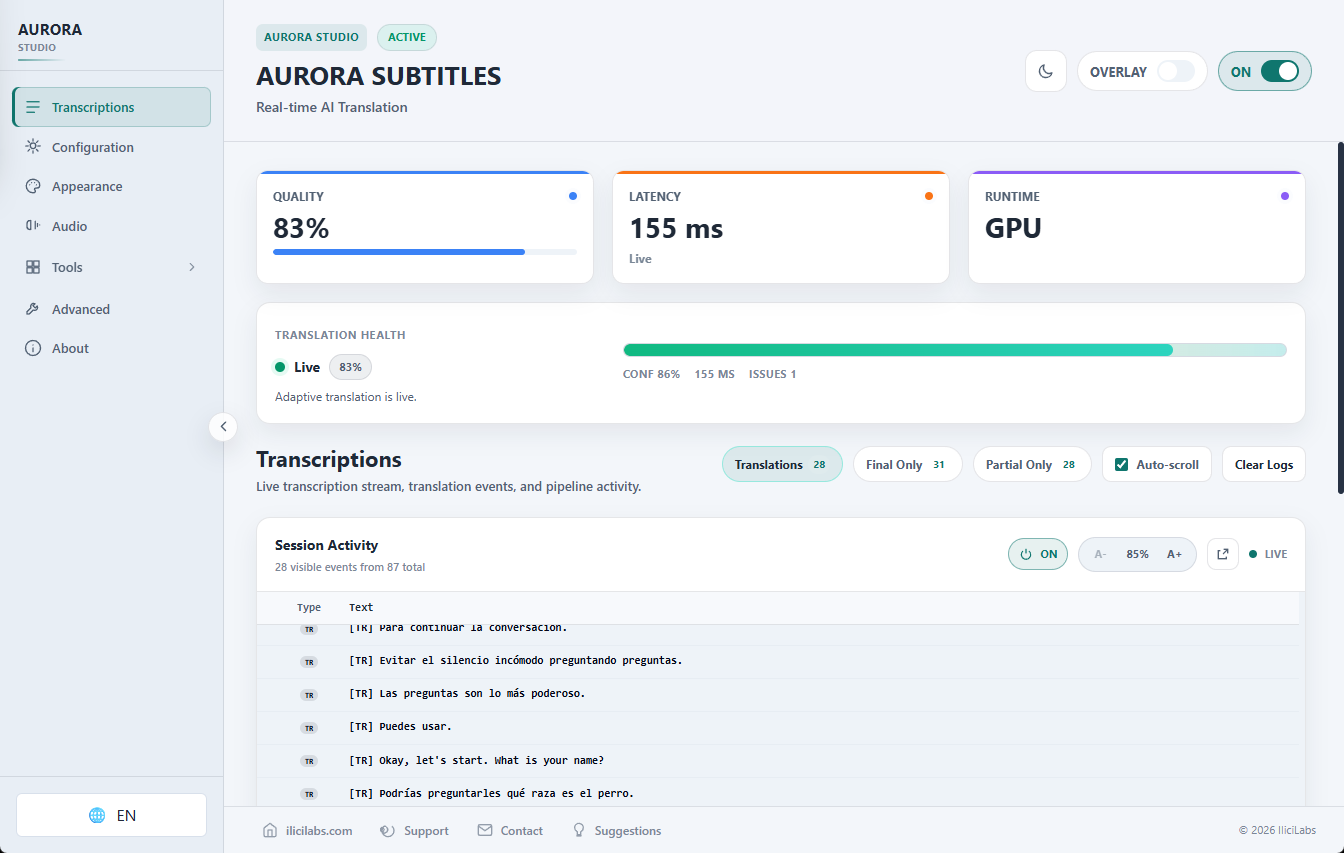
アプリの上に字幕を表示し、ウィンドウを切り替えずに読み、翻訳し、作業を続けられます。
AuroraはDiscord、ゲーム、会議、配信、動画の上にライブ字幕とリアルタイム翻訳を表示します。一回払い。月額なし。
アプリの上に字幕を表示し、ウィンドウを切り替えずに読み、翻訳し、作業を続けられます。
コアpipelineは対応ハードウェア上でローカル実行されます。
製品デモ
AuroraはDiscord、ゲーム、会議、配信、動画の上にライブ字幕とリアルタイム翻訳を表示します。一回払い。月額なし。
アプリの上に字幕を表示し、ウィンドウを切り替えずに読み、翻訳し、作業を続けられます。
一回払い。ライフタイムライセンス。Early Access更新込み。 月額サブスクなし。
Auroraを購入 - 一回払い向いている用途
AuroraはDiscord、ゲーム、会議、配信、動画の上にライブ字幕とリアルタイム翻訳を表示します。一回払い。月額なし。
AuroraはDiscord、ゲーム、会議、配信、動画の上にライブ字幕とリアルタイム翻訳を表示します。一回払い。月額なし。
アプリの上に字幕を表示し、ウィンドウを切り替えずに読み、翻訳し、作業を続けられます。
Aurora Subtitlesは医療機器ではなく、専門的なアクセシビリティサービスを置き換えるものではありません。
ライフタイムライセンス
Windows 11とNVIDIA CUDA GPUが必要です。最終価格と現地通貨は決済画面で表示されます。
リアルタイムの字幕翻訳に必要なものがすべてお使いのマシン上で実行されます。
Capture system audio or microphone with WASAPI and turn Windows voice into live captions or translated subtitles. Latency varies by hardware and settings.
コアの転写と翻訳は PC 上でローカルに実行されます。アクティベーション、ライセンスのチェック、アップデート、モデルのダウンロードによりサーバーに接続される場合があります。
Aurora translates locally with its translator across the supported language set, using simple language names in the app.
Requires an NVIDIA GPU with CUDA support and updated drivers for practical real-time transcription and translation.
透明でカスタマイズ可能なクリックスルー字幕ウィンドウ。フォント、色、位置、不透明度を好みに合わせて調整します。
Aurora は、ローカル トランスクライバ、Silero VAD、ローカル トランスレータ、および準備された CUDA ランタイムを使用します。
Auroraを選ぶ理由
AuroraはDiscord、ゲーム、会議、配信、動画の上にライブ字幕とリアルタイム翻訳を表示します。一回払い。月額なし。
Windows 11とNVIDIA CUDA GPUが必要です。最終価格と現地通貨は決済画面で表示されます。
支払い: 一回払い
ライセンス: ライフタイム
利用: local-first
更新: Early Access
サブスクなし
一回払い。ライフタイムライセンス。Early Access更新込み。
Windows 11とNVIDIA CUDA GPUが必要です。最終価格と現地通貨は決済画面で表示されます。
Auroraを購入 - 一回払い
一回払い。ライフタイムライセンス。Early Access更新込み。 月額サブスクなし。
Auroraを購入 - 一回払い価値の比較
AuroraはDiscord、ゲーム、会議、配信、動画の上にライブ字幕とリアルタイム翻訳を表示します。一回払い。月額なし。
聴覚サポート
AuroraはDiscord、ゲーム、会議、配信、動画の上にライブ字幕とリアルタイム翻訳を表示します。一回払い。月額なし。
Aurora Subtitlesは医療機器ではなく、専門的なアクセシビリティサービスを置き換えるものではありません。
Aurora Subtitlesは医療機器ではなく、専門的なアクセシビリティサービスを置き換えるものではありません。
Auroraを購入 - 一回払いAuroraを試しますか?
一回払い。ライフタイムライセンス。Early Access更新込み。 月額サブスクなし。
AuroraはDiscord、ゲーム、会議、配信、動画の上にライブ字幕とリアルタイム翻訳を表示します。一回払い。月額なし。
AuroraはDiscord、ゲーム、会議、配信、動画の上にライブ字幕とリアルタイム翻訳を表示します。一回払い。月額なし。
アプリの上に字幕を表示し、ウィンドウを切り替えずに読み、翻訳し、作業を続けられます。
Aurora Subtitlesは医療機器ではなく、専門的なアクセシビリティサービスを置き換えるものではありません。
Download Aurora Subtitles and prepare the realtime stack: local transcriber, Silero VAD, and local translation models.
ソース言語とターゲット言語を選択します。名前、ブランド、技術用語、または特定のシナリオに関する音声ガイダンスを追加します。
[開始] をクリックするか、グローバル ホットキーを使用します。 通話字幕は、画面上にカスタマイズ可能なオーバーレイとして表示されます。
技術pipelineの短い説明: ネイティブ音声キャプチャ、文字起こし + Silero VAD、ローカル翻訳、画面overlayです。
音声入力 (WASAPI)
AuroraはWindowsのマイクまたはシステム音声を低遅延のネイティブキャプチャで取得します。
文字起こし + Silero VAD
ローカル文字起こしとSilero VADで音声を区切り、低遅延を保ちます。
ローカル翻訳
Auroraが用意した翻訳器とCUDA runtimeでテキストをローカル翻訳します。
Overlay字幕
翻訳字幕はゲーム、会議、配信向けの設定可能なoverlayとして表示されます。
ローカルpipelineの詳細
WASAPI、文字起こし、Silero VAD、ローカル翻訳、GPU、overlayを順番に説明します。
AuroraはWindows上の実際の音声を追うために作られています: チャット、ゲーム、会議、配信、授業、アクセシビリティ、多言語会話。
AuroraはDiscord、ゲーム、会議、配信、動画の上にライブ字幕とリアルタイム翻訳を表示します。一回払い。月額なし。
アプリの上に字幕を表示し、ウィンドウを切り替えずに読み、翻訳し、作業を続けられます。
Aurora Subtitlesは医療機器ではなく、専門的なアクセシビリティサービスを置き換えるものではありません。
ゲームプレイを中断しない透明なクリックスルー字幕を使用して、別の言語でボイスチャットをフォローできます。
瞬時に翻訳された字幕が画面上に表示されるので、国際的なストリーム、ポッドキャスト、ビデオをフォローできます。
リアルタイムのキャプションと翻訳を使用して、多言語の会議やビデオ会議をナビゲートします。
AI を活用したライブ字幕で講義や教育コンテンツにアクセスできます。
通話字幕を使用して、お気に入りのポッドキャストを任意の言語で聴くことができます。
Follow Teams, Zoom, or Google Meet calls with real-time captions and translation.
Watch YouTube videos without waiting for official subtitles.
会議、授業、動画、日常コンテンツで視覚字幕が役立つユーザーに便利です。医療機器ではありません。
主なworkflowがライブ音声なら、Auroraが入口です。
Auroraを購入 - 一回払い実際のWindows workflow
Windowsワークフローの上に出るリアルタイムoverlayで、音声チャットやマルチプレイ会話を追えます。
Discord ライブ字幕, ゲーム字幕 Windows, Discord 音声チャット 翻訳
会議にbotを追加せず、マイクまたはシステム音声をローカルでキャプチャしてTeams、Zoom、Google Meetで使えます。
会議 ライブ字幕, Teams ローカル字幕, Zoom live captions Windows
YouTube、Twitch、オンライン講座、ウェビナーなどWindows音声を字幕化または翻訳します。
PC音声 リアルタイム字幕, Twitch 翻訳, YouTube live subtitles Windows
字幕に頼る人がWindowsアプリ、通話、配信、動画の音声を追いやすくします。
聴覚サポート 字幕 Windows, アクセシビリティ字幕 Windows
検索意図別ガイド
Live Captions代替、Discord字幕、PC音声overlay、ローカル音声翻訳などの検索意図を分けています。
Windows Live Captionsは基本字幕に便利です。Auroraは翻訳、設定可能なoverlay、Windowsシステム音声workflowが必要なユーザー向けです.
レイテンシは変化します
言語オプション
핵심 pipeline 로컬
NVIDIA CUDA required
Aurora Subtitles requires an NVIDIA GPU with CUDA support for practical real-time use. Full GPU translation requires at least 6GB VRAM; 8GB+ VRAM is recommended. 4GB VRAM can use limited compatibility mode with the translator on CPU and higher latency.
Aurora SubtitlesはWindows向けのリアルタイムAI文字起こしと翻訳を提供します。NVIDIA CUDA GPUが必要で、完全なGPU翻訳には最低6GB VRAMが必要です。
Early Access는 Aurora가 계속 개선된다는 뜻입니다. 요구 사항은 명확히 공개되고 업데이트가 포함됩니다.
전문가 검토를 대체하지 않으며 의료, 법률, 금융, 안전 결정의 유일한 근거로 사용하면 안 됩니다.
궁금한 점이 있나요? FAQ를 확인하세요. 상업 모델은 간단합니다: 일회성 결제, 월 구독 없음.
Auroraを購入 - 一回払い一回払い。ライフタイムライセンス。Early Access中のアップデート込み。最終価格と現地通貨は決済画面で表示されます。
Early AccessではAuroraが継続的に改善されます。要件は明確に公開され、購入者のフィードバックが反映されます。
Lemon Squeezyによる安全な決済
로컬이 중요한 이유
Aurora는 Windows에서 로컬 번역기와 live captions 도구로 작동하도록 만들어졌습니다. 더 많은 개인정보 보호와 설정 제어를 제공합니다.
지원 언어
회의, 수업, 영상, 스트림, Discord, 국제 통화의 실시간 오디오를 내 PC에서 로컬 자막으로 번역합니다.
オプション
핵심 pipeline 로컬
高速化
Auroraで利用可能な言語
会話、会議、動画、配信向けのローカル翻訳字幕。
Aurora SubtitlesはAIを使用し、誤りが起こる場合があります。重要な用途では必ず内容を確認してください。
主なworkflowがライブ音声なら、Auroraが入口です。
Auroraを購入 - 一回払い