Discord and voice chats
Follow Discord voice chats with live subtitles, even when people speak fast or in another language.
Aurora Subtitles
Aurora puts live captions and real-time translation over Discord, games, meetings, streams, and videos. One-time payment. No monthly subscription.
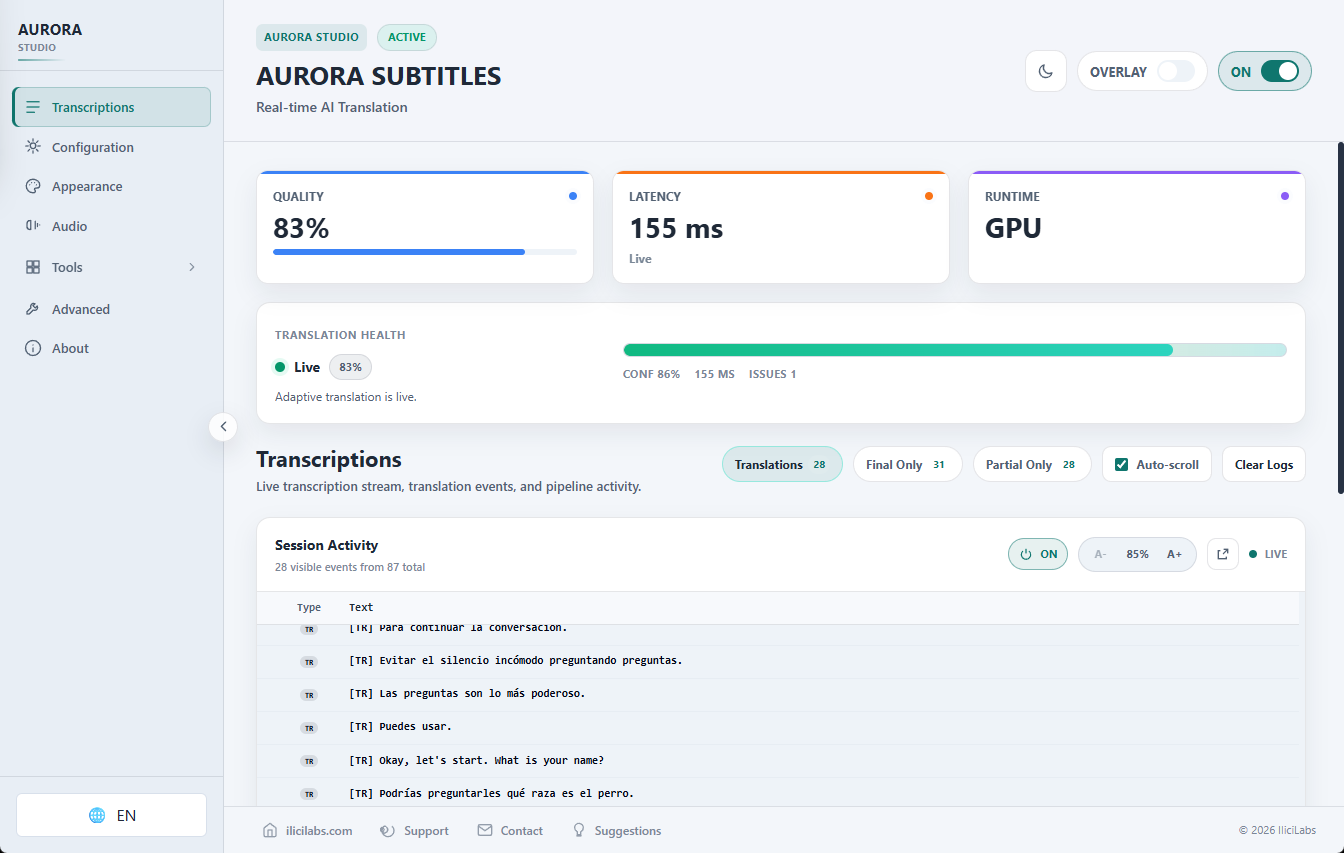
Captions over your apps: read, translate, and keep working without switching windows.
Read voice chats while staying in your app.
Turn spoken audio into translated subtitles.
Core pipeline runs locally on compatible PCs.
Product demo
Play a video, call, stream, or voice chat. Aurora listens to your PC audio and shows translated captions as an overlay.
Demo: Aurora processing real Windows audio and showing translated live subtitles.
Local-first audio processing. No monthly subscription. One-time payment. Lifetime license. Early Access updates included.
Buy Aurora - one-time paymentWhere it fits
Aurora is a Windows desktop app: it listens to PC audio, generates live captions, and displays translation in a configurable overlay.
Follow Discord voice chats with live subtitles, even when people speak fast or in another language.
Read subtitles over the game while following team calls or cooperative sessions.
Use captions for meetings, calls, and professional content without adding bots to the call.
Turn streams, classes, webinars, and video audio into subtitles over Windows.
Compare speech with translated subtitles while following classes, talks, and foreign content.
Can help people who rely on captions follow calls, videos, and online content.
Lifetime license
Aurora Subtitles is sold as a one-time payment. You receive a lifetime license for the current Aurora Subtitles product, with updates included during Early Access.
Everything you need for real-time subtitle translation, running entirely on your machine.
Capture system audio or microphone with WASAPI and turn Windows voice into live captions or translated subtitles. Latency varies by hardware and settings.
Core transcription and translation run locally on your PC. Activation, license checks, updates, and model downloads may contact servers.
Aurora translates locally with its translator across the supported language set, using simple language names in the app.
Requires an NVIDIA GPU with CUDA support and updated drivers for practical real-time transcription and translation.
Transparent, customizable, click-through subtitle window. Adjust fonts, colors, position & opacity to your taste.
Aurora uses a local transcriber, Silero VAD, a local translator, and a prepared CUDA runtime.
Why Aurora?
Aurora Subtitles is built for people who want real-time captions and translation without monthly plans, usage limits, or credit-based pricing.
Aurora runs the core speech-to-text and translation pipeline locally on your Windows PC, using your NVIDIA GPU. It is not just another meeting assistant: it is a local live caption and translation overlay for real Windows workflows.
No monthly subscription
No per-minute cloud credits
No cloud usage meter for daily captioning
Core transcription and translation run locally
Works with microphone and Windows system audio
Discord, meetings, games, streams, and accessibility workflows
No subscription
Cloud live translation services often charge monthly fees because every minute of audio can create ongoing server costs. Aurora takes a different approach: it runs the core transcription and translation pipeline locally on your own Windows PC.
If you already have a compatible NVIDIA GPU, Aurora lets you use your own hardware instead of paying every month for cloud translation minutes.
Stop renting live translation. Run it locally.
One-time payment, no monthly subscription. Lifetime license. Early Access updates included.
Buy Aurora - one-time paymentValue comparison
Aurora is positioned as a local-first, no-subscription alternative for Windows users who prefer to control the core captioning workflow on their own machine.
Hearing support
Aurora Subtitles is not a medical device, but it can help Windows users who rely on captions follow voice conversations, meetings, videos, streams, and everyday PC audio with live captions and translated subtitles.
The configurable overlay can fit accessibility workflows when built-in captions do not cover a specific app, audio source, or workflow need.
Aurora Subtitles is not a medical device and is not a replacement for professional accessibility services, human interpreters, or legally required accessibility accommodations.
Try Aurora for live captionsReady to try Aurora?
One-time payment. Lifetime license. Early Access updates included. No monthly subscription.
Aurora is already being used in practical Windows voice, translation, and caption workflows.
Early Windows users use Aurora to follow voice conversations on Windows.
The overlay helps in meetings, calls, and multilingual conversations.
It also fits hearing support workflows for people who rely on captions.
Use
Already used by early Windows users for Discord, meetings, and accessibility workflows.
Privacy
The core pipeline runs locally on compatible hardware.
Next step
Download Aurora Subtitles and prepare the realtime stack: local transcriber, Silero VAD, and local translation models.
Select source and target languages. Add speech guidance for names, brands, technical vocabulary, or specific scenarios.
Click START or use your global hotkey. Real-time subtitles appear as a customizable overlay on your screen.
If you are searching for how the technical pipeline works, here is the short version: native audio capture, transcriber + Silero VAD, local translator, and an on-screen overlay.
Audio input (WASAPI)
Aurora listens to microphone or system audio on Windows using native capture with low latency.
Transcriber + Silero VAD
Aurora uses a local transcriber and Silero VAD to segment speech and keep latency low.
Local translation
Text is translated locally with the translator and the CUDA runtime prepared by Aurora.
Overlay subtitles
Translated subtitles appear on screen as a customizable overlay for games, meetings, and streams.
Deep dive into the local pipeline
Explains WASAPI, transcriber, Silero VAD, local translation, GPU, and the overlay step by step.
Aurora is built for following real voice on Windows: chats, games, meetings, streams, classes, accessibility, and multilingual conversations.
Follow Discord voice chats with live subtitles, even when people speak fast or in another language.
Read subtitles over the game while following team calls or cooperative sessions.
Use captions for meetings, calls, and professional content without adding bots to the call.
Turn streams, classes, webinars, and video audio into subtitles over Windows.
Compare speech with translated subtitles while following classes, talks, and foreign content.
Can help people who rely on captions follow calls, videos, and online content.
Translate voice conversations when the original language is difficult to follow in real time.
Follow voice chat in another language with transparent, click-through subtitles that won't disrupt gameplay.
Follow international streams, podcasts and videos with instant translated subtitles on screen.
Navigate multilingual meetings and video conferences with real-time captions and translations.
Access lectures and educational content with AI-powered live captions.
Listen to your favorite podcasts in any language with real-time subtitles.
Follow Teams, Zoom, or Google Meet calls with real-time captions and translation.
Watch YouTube videos without waiting for official subtitles.
Useful for users who benefit from visual captions in meetings, classes, videos, and daily content. Not a medical device.
If your main workflow is live voice, Aurora is the starting point.
Buy Aurora - one-time paymentReal Windows workflows
Follow voice chat, multiplayer sessions, and game-related conversations with a real-time overlay that works on top of your Windows workflow.
Discord live captions, Discord subtitles, real-time subtitles for gaming, translate Discord voice chat, Windows gaming subtitles
Use Aurora with Teams, Zoom, Google Meet, and other meeting tools by capturing microphone or system audio locally, without adding bots to the meeting.
private live captions for meetings, local captions for Teams, Zoom live captions Windows, Google Meet translation Windows, meeting subtitles without bot
Use Aurora to caption or translate audio from YouTube, Twitch, online courses, webinars, and other Windows audio sources.
real-time subtitles for PC audio, translate Twitch live, YouTube live subtitles Windows, live captions for Windows system audio
Aurora can help people who rely on captions follow spoken audio across Windows apps, calls, streams, and videos.
hearing support captions Windows, accessibility captions for Windows, live captions for Windows
Search-focused guides
These pages separate real search intents: Live Captions alternative, Discord subtitles, PC audio overlay, and local speech translation.
Windows Live Captions is useful for basic captions. Aurora is for users who need more control, translation workflows, a configurable overlay, and Windows system audio workflows.
Latency varies
Language options
Core pipeline local
NVIDIA CUDA required
Aurora Subtitles requires an NVIDIA GPU with CUDA support for practical real-time use. Full GPU translation requires at least 6GB VRAM; 8GB+ VRAM is recommended. 4GB VRAM can use limited compatibility mode with the translator on CPU and higher latency.
Aurora Subtitles provides real-time AI transcription and translation for Windows. It requires an NVIDIA GPU with CUDA support; full GPU translation needs 6 GB VRAM minimum. With 4 GB, limited compatibility mode can run the translator on CPU.
Early Access means Aurora is actively improving. Requirements are published clearly, updates are included, and buyer feedback helps shape the product.
It does not replace professional human review and should not be the sole source for medical, legal, financial, or safety decisions.
Have questions? Read the FAQ, but the commercial model is simple: one-time payment, no monthly subscription.
Buy Aurora - one-time paymentOne-time payment. Lifetime license. Early Access updates included. Final price and local currency are shown at checkout.
Early Access means Aurora is actively improving. Requirements are published clearly, updates are included, and buyer feedback helps shape the product.
Secure payment via Lemon Squeezy
Why local matters
Aurora is built to work as a local translator and live captions tool on Windows. That means more privacy, more control over your setup, and less dependency on external services for daily workflows.
Supported languages
Translate live audio on Windows with local subtitles for meetings, classes, videos, streams, Discord, and international calls while keeping voice and text on your own PC.
options
Core pipeline local
accelerated
Languages available in Aurora
Local translated subtitles for conversations, meetings, videos, and streams.
See how the product is evolving with every new version. Early Access includes updates during the early access period.
Aurora Subtitles uses AI and may make mistakes. Always verify content before using it in critical contexts.
If your main workflow is live voice, Aurora is the starting point.
Buy Aurora - one-time payment